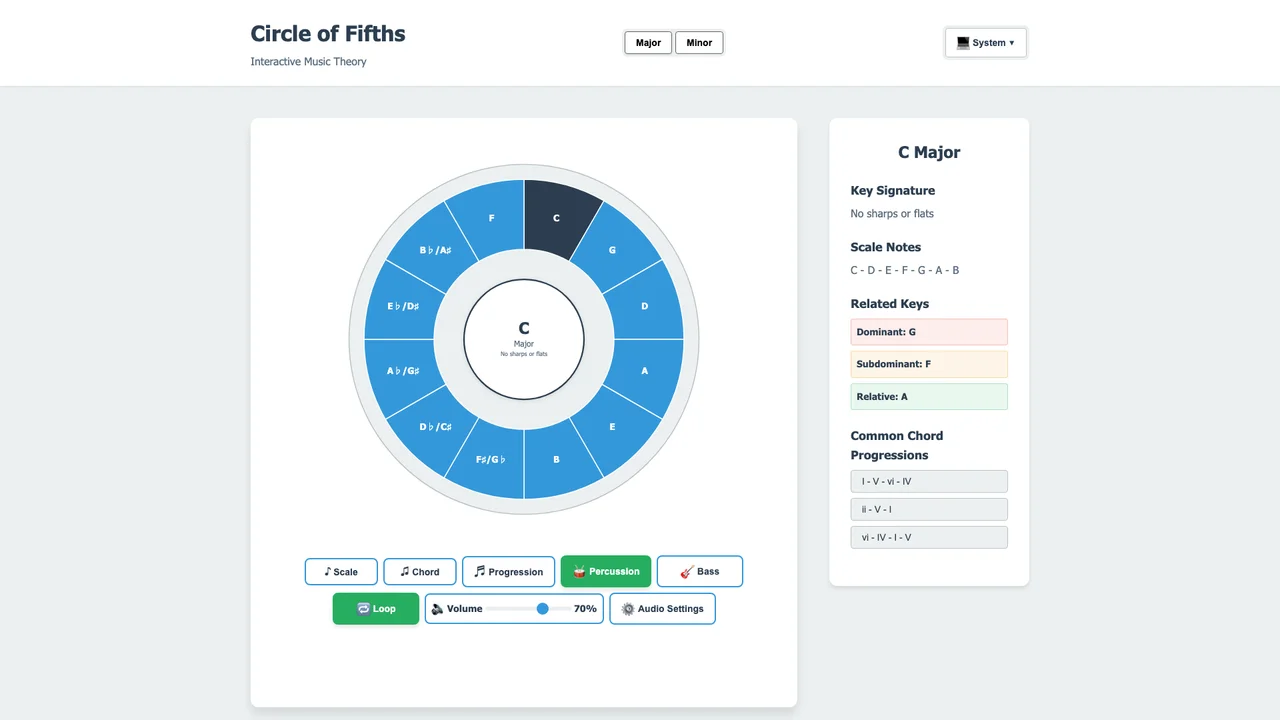
A static diagram of the Circle of Fifths can show you that adjacent keys sit a perfect fifth apart, but it cannot let you hear it. This project closes that gap: click any of the twelve keys and the Web Audio API synthesizes the pitch in real time, connecting the circle’s geometry to the harmonic relationships it encodes.
Circle of Fifths
Perfect Fifth: G
Perfect Fourth: F
Tap or click any key to hear its root note. The outer ring shows major keys, the inner ring shows relative minors.
Key Features
- Interactive Visualization: Click and explore the circle of fifths
- Audio Feedback: Hear scales and chords using Web Audio API
- Key Relationships: Understand relative majors/minors and chord progressions
- Educational Design: Clear visual representation of music theory concepts
Technical Implementation
The Web Audio API provides real-time audio synthesis:
const A4_FREQUENCY = 440; // Hz
const SEMITONE_RATIO = Math.pow(2, 1/12);

function noteToFrequency(note, octave) {
  const noteIndex = ['C', 'C#', 'D', 'D#', 'E', 'F',
                     'F#', 'G', 'G#', 'A', 'A#', 'B'].indexOf(note);
  const semitonesFromA4 = (octave - 4) * 12 + (noteIndex - 9);
  return A4_FREQUENCY * Math.pow(SEMITONE_RATIO, semitonesFromA4);
}
Each key in the circle is positioned 30 degrees apart, representing the perfect fifth interval that defines the circle’s structure.
What was hard
The audio side held the real surprises. Modern browsers start every AudioContext in a suspended state to block autoplay, so the app resumes the context on the first user interaction. Without that pre-warming, the first click on a key would produce silence. Raw oscillator starts and stops also click audibly; shaping each note with a gain envelope that ramps down exponentially makes the tones sound like an instrument instead of a test signal. On the visual side, the circular layout is pure trigonometry: twelve keys at 30-degree intervals with a -90-degree offset to put C at the top. But every key still needed a 44px minimum touch target so the circle stays usable on phones.
Was this helpful?
Want to learn more?
Ask can answer questions about this project's implementation, technologies, and more.